
What my bouquet photo promises when the flowers change
 Florist with a WooCommerce shop
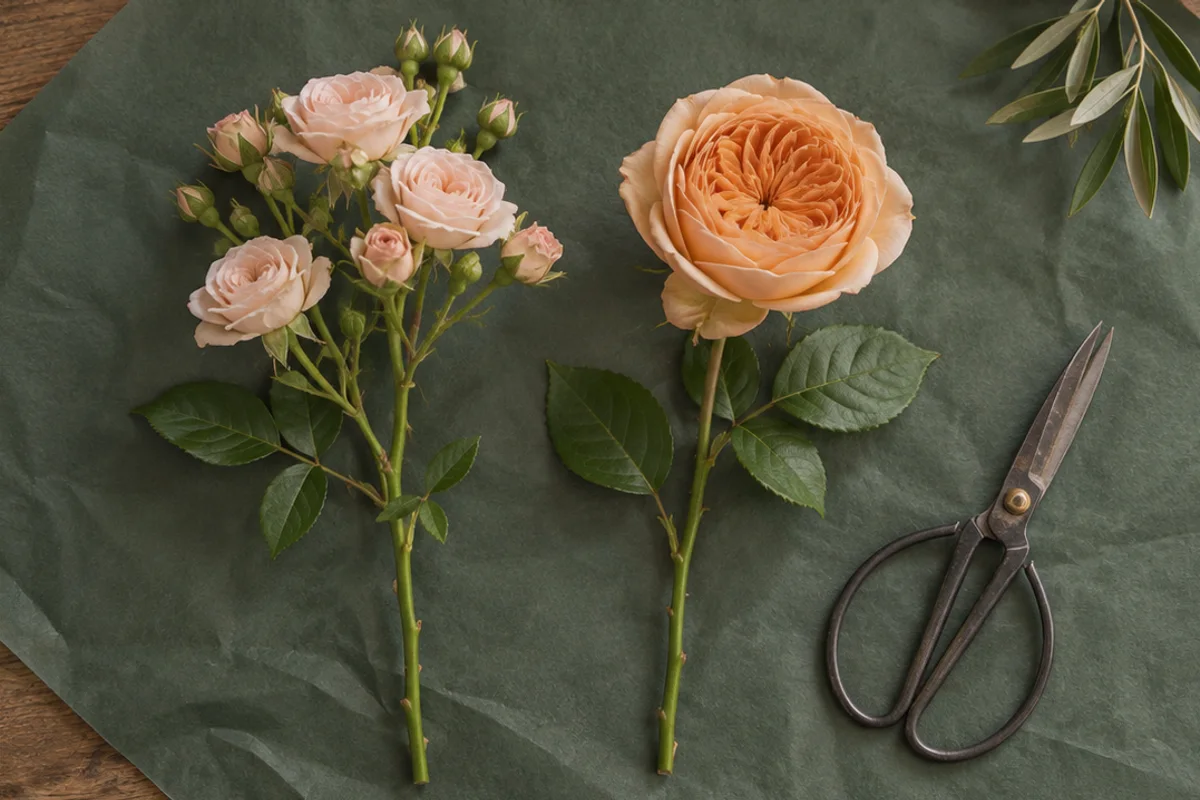
My supplier can bring a different apricot rose from one morning to the next. I need a listing that helps someone choose a bouquet without promising an exact stem I no longer have.
I start with today's stems
I unwrap the delivery and make the bouquet I could actually send today. I photograph the whole bunch in its kraft-paper wrap. In the old hero shot one large garden rose filled the middle; today's spray roses break up that space into smaller flowers. Both arrangements can have the same warm palette and still look quite different.
Two stems explain more than a swatch
I lay one branching stem and one single bloom next to each other on the bench. The side-by-side photograph shows why a substitution changes the outline of the bouquet. I don't try to make the smaller blooms look bigger by moving them toward the lens. Beside the photo I describe which colors and shape I aim to keep when stock changes.
What I look for in the export
I send copies of the new product photos through RemoveDog and compare the apricot petals with my originals. A preview that makes the ivory filler look peach would leave the buyer with the wrong idea. I also check the edges of the kraft wrap so the main photo shows the bunch I deliver, not a vase someone might expect in the box.
I date the picture in my own records
I keep the shoot date with the original arrangement, then change the product photo and the availability note in the same edit. If the next delivery changes only a filler stem, the current photograph may still explain the bouquet well. If the focal flower changes, that stem comparison reminds me to look at the whole listing again.